An Archival Video Frame Looks Combed. Choose a Faithful Still, Not Just a Smoother One
An Archival Video Frame Looks Combed. Choose a Faithful Still, Not Just a Smoother One
A clean archival still is not necessarily a faithful one. Before smoothing the striped edge of a moving hand, establish how the supplied video is being interpreted, inspect the surrounding motion, and decide what the still needs to communicate. Sometimes the right answer is a documented deinterlaced derivative. Sometimes it is a different moment. Sometimes the source cannot support the claim you want the image to make.
Keep the original file and its source position attached to that decision. The pitch may need one image; the person checking it later needs to know where that image came from and what happened to it.
A frame can contain more than one moment
Interlaced video divides a picture into two fields of alternating horizontal lines. Motion between fields can produce the familiar combed edge when they appear together. That is why a moving sleeve may look striped while a stationary doorway looks relatively continuous. Adobe identifies combing during motion and difficulty freezing frames among the challenges of interlaced footage.[^overview]
The distinction is temporal, not just cosmetic. The two sets of lines may describe the subject at different positions. Turning them into a more comfortable picture does not make those positions simultaneous.
For a pitch writer, the consequence depends on the sentence beside the image. A still that introduces the atmosphere of a workshop has a different burden from one captioned as the instant a worker's hand reaches a switch. Both should be traceable, but the second asks the picture to establish a specific relationship. It matters which recorded information survives the processing.
Do not let the intended caption decide the technical diagnosis. “This needs to show contact” is an editorial wish, not evidence that contact is visible in the source.
Begin before the JPEG
Return to the supplied video, not the already processed still. Preserve an untouched copy and collect whatever identifies it: archive reference, transfer filename, source position, and any notes supplied about scanning or conversion. Ask which file is the closest available version to the material you are trying to represent. “Original” should identify a particular file or recording, not function as a reassuring adjective.
Write down what is known and what is assumed. A field-order setting found in an editor is not, by itself, an account of every earlier transfer. When provenance is unclear, ask the archive or supplier what the delivery contains before committing to an interpretation.
Premiere's documented inspection route is the Project panel's Modify > Interpret Footage, where the Field Order section includes Use Field Order from File. Adobe advises checking source metadata or camera documentation when the correct order is uncertain.[^interpretation] Record the current value before changing anything. A note that says “fixed interlacing” leaves the actual decision unrecoverable.
Then examine a short passage around the proposed still. Watch the motion and inspect nearby positions. Is the distracting edge associated with movement? Is it present in the supplied file or only in the version someone exported? Does a nearby moment communicate the same thing without depending on the troublesome detail?
These are diagnostic questions, not a guarantee that visual inspection can reconstruct an unknown transfer history. Do not diagnose every jagged edge as interlacing, or assume that choosing the setting that looks nicest reveals the correct history.
Adobe also documents monitor choices for displaying the first field, second field, or both. Those controls depend on whether the clip or active sequence is interlaced; they are disabled in the progressive cases the documentation specifies.[^display] Note what you are actually viewing. A monitor display choice and a processing decision are different things to record.
See what a smoother picture can leave out
Here is an original, deliberately simple example. It is synthetic—not archival footage and not a Premiere output. The construction and pixel checks are included with this article.
A white bar moves past a fixed gray marker. In a 160 × 96 pixel image, the marker occupies columns 80–81. Three constructed scene samples place the bar as follows; coordinates start at zero:
| Scene sample | Assigned time | Bar columns | Relationship to marker |
|---|---|---|---|
| A | 0 ms | 60–71 | Entirely before it |
| B | 20 ms | 84–95 | Entirely beyond it |
| C | 40 ms | 108–119 | Farther beyond it |
The times are chosen for the example. They say nothing about the frame rate of a particular archive. The full samples are available in the fixture folder.
Now make one woven image: take the even-indexed rows from A and the odd-indexed rows from B. Half the picture describes the earlier position; half describes the later position. In this fixture, the top field is deliberately assigned to the earlier time. Do not transfer that assumption to an unidentified clip.
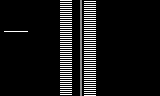
The combed result contains two sampled positions. It is not a record of one full-height bar occupying both positions at once.
For the second image, retain the top-field rows and copy each into the neighboring missing row. This is a deliberately crude reconstruction, not Adobe's deinterlacing algorithm.

The outline is continuous. The later field's bar position has been discarded; the missing rows have been filled by an explicit rule.
The example includes a stationary detail only one row high, at row 31. It exists in the full scene samples but not in the retained even-indexed rows. The reconstruction loses it. That absence is numerically checked in the fixture; it is not an impression based on which picture looks sharper.
There are two separate costs here. Selecting a field removes the other field's temporal contribution. Filling missing rows does not recover every detail absent from the retained samples. The constructed bar happens to be simple enough that repeating rows makes a convincing outline. That convenience is exactly why a clean edge is a poor certificate of fidelity.
What about the crossing itself? Sample A places the bar before the marker and B places it beyond. Neither sampled instant shows overlap. We should not label a processed image “the exact moment of contact.” We can describe the sequence as a bar passing the marker, but that broader observation is not the same claim.
An alternative still from C would truthfully show the bar after it has passed. Whether that is suitable depends on the page's job. It solves nothing if the page still claims to show the moment of crossing.
Three Premiere controls, three different questions
Premiere's Field Options are useful here precisely because the controls are not interchangeable. Adobe's documentation, updated January 7, 2026, distinguishes these operations:[^processing]
- Reverse Field Dominance changes field playback order.
- Always Deinterlace discards one field and interpolates missing lines from the retained field.
- Flicker Removal blurs neighboring lines to address thin-line flicker; it does not deinterlace.
The retained field also depends on settings. Adobe states that Always Deinterlace in a No Fields (Progressive Scan) sequence retains the upper field; adding Reverse Field Dominance in that case retains the lower field.[^processing]
Those are documented behaviors, not results of a native application test performed for this article. Do not mistake the row-copy illustration above for a comparison of Premiere's outputs.
The practical discipline is to change one relevant variable at a time. Keep the candidate position and other settings constant while inspecting a particular operation. Record the sequence's field setting as well as the clip operation. Otherwise, two apparently comparable exports may have taken different routes without anyone noting why.
Ask a different question of each change. Are you correcting an established interpretation problem? Choosing which temporal sample contributes to a still? Addressing a thin-line display problem? “It looks smoother” does not answer any of those questions on its own.
Nor does it follow that the most technically elaborate treatment is the most appropriate. When another supplied moment already communicates the intended observation, processing the difficult frame may create work and uncertainty without improving the page.
Compare candidates against the claim
Make a small comparison that keeps the decision visible. Include the source candidate, a specifically described derivative, and a plausible alternative moment or supplied source. Give each a locator. Keep the inspection view separate from the finished page so that a pleasing crop or a large headline does not conceal the detail under discussion.
When candidates come from the same nominal frame but retain different fields, label them separately. A shared frame locator does not by itself identify the same temporal sample. The comparison record needs the retained field as well as the frame or time reference.
First compare what each image says about the event. Does the derivative retain the instant relevant to the caption? Does the alternative come from the same passage? Has choosing a calmer moment changed the impression of an action, relationship, or situation? Technical cleanliness does not excuse selecting an unrepresentative expression.
Then compare the actual information the page uses. If the caption names lettering on a sign, inspect those letters rather than declaring the whole image acceptable because the face looks better. If the page concerns two people meeting, do not use a process-generated edge to settle whether their hands touch. A source can support the overall scene while leaving one asserted detail unresolved.
Finally, inspect the candidate at its intended size in the deck. This is a presentation check, not a second opportunity to change the historical claim. The technical record should still describe the source and operation even when the derivative will appear relatively small.
A useful comparison note is specific:
Candidate B is easier to read, but it discards the later field. The caption requires only that the person is operating the machine, which the surrounding passage establishes. It does not identify an exact contact instant. Keep B as a disclosed derivative and retain the source locator.
That is an illustrative decision format, not a judgment about any real recording. Its value lies in connecting the processing choice to the sentence the image must support.
A rejection note can be equally brief:
Both candidate derivatives leave the relevant lettering uncertain. Do not transcribe it in the caption. Seek a better supplied source or use a different image.
Not every uncertainty needs a repair. Some need a narrower sentence.
Keep the derivative recoverable
The source record and the reader-facing caption have different jobs. The record preserves enough detail for another person to reconstruct the decision. The caption communicates what readers need to understand the image without being misled.
For the synthetic example, a usable record reads:
Source: original synthetic field fixture; no historic footage.
Source position: woven A/B pair, using assigned samples at 0 and 20 ms.
Interpretation: top field defined as earlier; zero-based even rows from A, odd rows from B.
Operation: retain top-field rows; duplicate each into the following row. No Premiere processing.
Derivative:top-field-row-repeat.png.
Known limit: later bar position discarded; one-row detail at row 31 absent.
Permitted description: illustration of a field-selection and reconstruction trade-off. Not a recorded instant or a software benchmark.
For actual material, replace the synthetic declarations with verified source identifiers, the chosen time or frame reference, the named software version, and the settings actually used. Keep the original file separate from derivatives. If a supplier provides a corrected transfer, retain the relationship between deliveries rather than quietly renaming it as the earlier source.
Carry uncertainty forward. “Field order unconfirmed” is important information, not an untidy note to remove before handing the page to a designer. The person assembling the deck should not have to rediscover that the attractive image was selected before the source interpretation was settled.
A visible caption need not contain a technical log. It should, however, avoid claiming an untouched recording when relevant detail has been reconstructed, or a precisely observed instant when the source only establishes a passage of action. Use the amount of disclosure the image's evidentiary role requires, while retaining the fuller record behind it.
The stopping point is not “the combing has disappeared.” It is a defensible choice: this source, this moment, this declared treatment, and this claim. When those do not fit together, change the presentation rather than making the pixels sound more certain than they are.
<!-- ARTICLE BODY END -->Sources
[^overview]: Adobe, “Interlaced video overview”, updated January 7, 2026; opening explanation and “Challenges with interlaced video.” Inspected September 19, 2026. Supports field structure and motion-related combing, not the provenance of a particular clip. [^interpretation]: Adobe, “Change the field order of a clip”, updated January 7, 2026; preliminary cautions and Interpret Footage steps. Inspected September 19, 2026. [^display]: Adobe, “Set display options for interlaced footage”, updated August 22, 2025; Source/Program Monitor options and progressive-setting restrictions. Inspected September 19, 2026. [^processing]: Adobe, “Create interlaced or non-interlaced clips”, updated January 7, 2026; Field Options and the note on progressive-sequence field retention. Inspected September 19, 2026. This article describes documentation, not a completed Premiere walkthrough.
Frequently asked questions
Why can a moving hand look striped in an archival video frame?
Interlaced video divides a picture into two fields of alternating horizontal lines. When fields are shown together, motion between them can produce a combed edge, so a moving sleeve may look striped while a stationary doorway looks continuous. The distinction is temporal, not just cosmetic: the two sets of lines may describe the subject at different positions.
What should be preserved and recorded before changing field order or deinterlacing?
Return to the supplied video rather than an already processed still. Preserve an untouched copy and collect identifiers such as archive reference, transfer filename, source position, and supplied notes. Record the current field-order value before changing anything; “fixed interlacing” is too vague to recover the decision. If provenance is unclear, ask the archive or supplier what the delivery contains.
What do Premiere’s Field Options do?
Reverse Field Dominance changes field playback order. Always Deinterlace discards one field and interpolates missing lines from the retained field. Flicker Removal blurs neighboring lines to address thin-line flicker and does not deinterlace. Adobe also states that Always Deinterlace in a No Fields (Progressive Scan) sequence retains the upper field; adding Reverse Field Dominance in that case retains the lower field.
Why can a smoother still be less faithful?
Selecting a field removes the other field’s temporal contribution, and filling missing rows does not recover every detail absent from the retained samples. In the synthetic example, a stationary detail only one row high at row 31 exists in the full scene but not in the retained even-indexed rows, and the reconstruction loses it. A clean edge is therefore a poor certificate of fidelity.
How should candidate stills be compared with the caption’s claim?
Compare the source candidate, a specifically described derivative, and a plausible alternative moment or supplied source, giving each a locator. When candidates come from the same nominal frame but retain different fields, label them separately because a shared frame locator does not identify the same temporal sample. Compare what each image says about the event and the actual information the page uses, then inspect at intended size. Document the processing choice and keep it recoverable.
 pitch.dog
Have something you’re working on?
Bring the brief, the rough idea, or the stuck bit. We write and design pitch decks, treatments, bibles and pitch sites.