Make an Exact Video Excerpt: Copy the Stream or Re-encode the Cut?
Make an Exact Video Excerpt: Copy the Stream or Re-encode the Cut?
Copy the stream when retaining encoded media is the priority and the resulting boundaries are acceptable. Decode, trim, and re-encode when the editorial interval must be exact—and verify the output either way. A command that finishes successfully has not necessarily made the cut you requested.
For a pitch excerpt, the difference can be consequential. An extra second might reveal a shot you meant to withhold, carry a speaker’s qualification into the wrong context, or spoil the rhythm you selected the clip to demonstrate. Conversely, a rough reference with useful handles may not need a precisely manufactured opening frame.
Preserving encoded packets and preserving an editorial interval are different requirements. The example here makes that distinction visible: the stream-copy route retained the source video packets but began 30 frames before the requested start. The re-encoded route contained precisely the requested 48 frames and audio samples. Those are results from one executed fixture, not promises about every codec, container, or player.[^experiment]
Specify the cut before choosing a command
Our original synthetic source is eight seconds long: 192 frames at 24 frames per second, numbered from zero, with one mono audio stream sampled at 48,000 samples per second. Every picture displays its source-frame number. High-contrast cells also encode that number so the test can identify decoded frames without guessing from timestamps or using optical character recognition.
The requested interval starts at source time 3.25 seconds and stops immediately before 5.25 seconds. That means:
| Boundary | Required value |
|---|---|
| First included source frame | 78 |
| Last included source frame | 125 |
| First excluded source frame | 126 |
| Included picture count | 48 |
| First included audio sample | 156,000 |
| First excluded audio sample | 252,000 |
| Included audio sample count | 96,000 |
These numbers follow from the fixture’s deliberately simple clocks: 3.25 × 24 = 78, and 3.25 × 48,000 = 156,000. Frame 125 begins at approximately 5.208333 seconds and lasts until the excluded boundary. Stopping before frame 126 does not mean stopping before frame 125 has played.
This is an end-exclusive specification: keep the start, drop the end. It removes the ambiguity in “cut from frame 78 to frame 126.” For a real excerpt, record the first wanted image, the first unwanted image, and the sound boundary separately. A sentence may need to finish after a visual cut; a music reference may need a lead-in before it. Those are editing decisions, not software errors.
Also name the source file and its version. A timestamp copied from yesterday’s rough cut is not a reliable address in today’s rearranged edit. Keep the original untouched and write every candidate excerpt to a new filename.
Inspect the streams and the clock you are using
The test source uses H.264 picture and uncompressed PCM audio inside a Matroska file. Its picture has keyframes at source frames 0, 48, 96, and 144, with no B-frames. Frame 78 is not a keyframe. These properties were checked in the generated source, rather than assumed from its filename.[^experiment]
Before adapting the example to another file, inspect that file:
ffprobe -v error -show_streams -show_format -of json source.mkv
FFprobe exposes stream and container information separately. It can also report individual packets and decoded frames, which are the more useful evidence when a nominal duration seems correct but a boundary is wrong.[^probe]
Our commands explicitly select the first video stream and first audio stream. That choice is appropriate for this fixture because it contains exactly those two streams. In a real source, identify the intended language, mix, picture stream, and any needed subtitles before copying the mapping. “First” is an address, not an editorial judgment.
Do not treat the fixture’s arithmetic as a universal conversion from seconds to frame numbers. It works because this source was constructed at a constant 24 frames per second with a known beginning. A variable-rate source or a file with nonzero starting timestamps needs its actual presentation timing interpreted. Likewise, a timecode printed in the picture is not automatically the same clock as the file’s timestamps.
This preliminary inspection has one purpose here: make sure the requested interval describes the media you will actually process. It is not a reason to redesign the whole reel’s export workflow.
Why stream copy can retain too much
FFmpeg’s input -ss seeks to an available seek point before the requested position when exact seeking is unavailable. Its documentation distinguishes the next step: normal accurate seeking during transcoding decodes and discards the preceding material, while stream copy preserves that extra segment.[^ffmpeg]
Stream copy avoids re-encoding the selected streams. It does not manufacture a new independently encoded picture at an arbitrary point inside the source’s existing structure.[^ffmpeg] Whether the resulting file presents exactly the requested interval therefore needs to be checked, not inferred from the word “copy.”
For the fixture, the first route was:
ffmpeg -n -ss 3.25 -i source.mkv -t 2 \
  -map 0:v:0 -map 0:a:0 -c copy copy.mkv
The -n option protects an existing output by refusing to overwrite it. Here -ss precedes the input, while -t 2 specifies an output-duration limit; it is not the source’s end timestamp.[^ffmpeg]
The result did not satisfy our boundary specification. Decoding it produced source frames 48 through 125: 78 pictures rather than 48. Its first picture came from source time 2.0 seconds, not 3.25. The extra 30 frames are 1.25 seconds of earlier material.[^experiment]
The packet-payload check nevertheless passed: the copied video packets matched the corresponding source payload hashes. There is no contradiction. The route successfully retained encoded picture data while retaining more of the source than the editorial interval permitted.
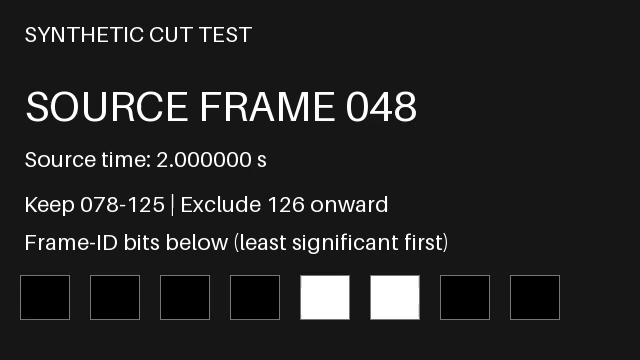
Audio also exceeded the requested interval. The copy contained 155,648 decoded samples beginning at source sample 98,304, or 2.048 seconds. It continued beyond the requested 5.25-second end. Its container duration was reported as 3.290 seconds. This is why a duration check should distinguish the container, the pictures, and the sound rather than reduce them to one rounded number.[^experiment]
The audio’s first packet was timestamped 0.048 seconds after the copied video’s first packet. That difference corresponds to their different source starting positions. It is not, by itself, evidence of a newly introduced synchronization error. The failure we can establish is unwanted material at the boundaries—not a claim that every retained sound was shifted against its picture.
Make the requested interval from decoded media
For the second route, the test decoded the source, selected frames 78–125 and audio samples 156,000–251,999, reset their output clocks, and encoded a new picture stream. It wrote PCM audio again so the audio samples could be compared directly without a lossy audio codec complicating the diagnostic.
Run this from the directory containing the fixture’s source.mkv, with a new output filename:
ffmpeg -n -i source.mkv \
  -filter_complex \
  "[0:v:0]trim=start_frame=78:end_frame=126,setpts=PTS-STARTPTS[v];[0:a:0]atrim=start_sample=156000:end_sample=252000,asetpts=N/SR/TB[a]" \
  -map "[v]" -map "[a]" \
  -c:v libx264 -preset medium -crf 18 -pix_fmt yuv420p -bf 0 \
  -c:a pcm_s16le exact.mkv
FFmpeg documents the frame and sample variants of trim and atrim as counting media passing through the filters. Their end values identify the first item to drop. The trimming filters do not themselves reset timestamps; the following setpts and asetpts expressions establish the output clocks.[^filters]
There is an important condition behind this particular command: it reads the source from the beginning. Its frame and sample counts refer to that complete decoded input. Do not add an earlier seek and assume these same counts still refer to the original file. They would then count the material reaching the filters after the changed input operation.
The output passed the fixture’s checks. Its decoded frame identifiers were exactly 78 through 125, in order, with neither missing nor additional frames. Its decoded audio was exactly the 96,000 requested source samples. The container duration was reported as 2.000 seconds.[^experiment]
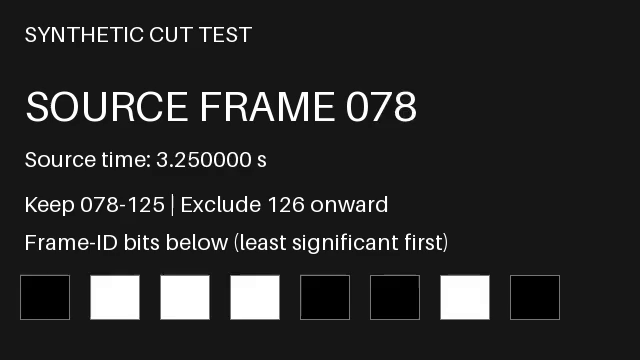
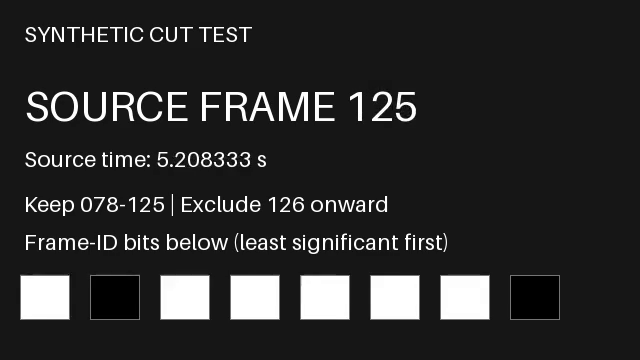
“Exact” describes the interval, not lossless picture reproduction. This command uses a lossy H.264 setting. The test established which source frames were represented, not that every decoded output pixel equaled the source pixel. Changing the encode may change image quality without changing the selected frame identities. Those are separate acceptance questions.
Nor is Matroska with PCM audio a general prescription for sending a pitch reel. It is a controlled test format. An eventual presentation or delivery encode needs its own requirements and a fresh check after that transformation.
Verify the pictures, the samples, and the actual file
A thumbnail can show a wanted image even when earlier material remains in the file. For our test, the script decoded every output frame and read its embedded identifier. It also saved the actual first and last decoded pictures shown above. That checks both edges and the intervening sequence, rather than accepting a player’s selected preview.
You can inspect a file’s decoded picture timing with:
ffprobe -v error -select_streams v:0 -show_frames \
  -show_entries frame=best_effort_timestamp_time,key_frame,pict_type \
  -of json exact.mkv
FFprobe’s packet and frame reports describe different layers.[^probe] In the fixture, the copied video payloads matched the source, but the decoded frame sequence exposed the early start. In the re-encoded file, the wanted source-frame sequence survived even though the picture stream had been newly encoded. A hash of the entire output file would answer neither editorial question.
The audio source includes original 40-millisecond tones just before the desired start, at the start, near the end, and at the first excluded end sample. Quiet deterministic noise under the tones lets the script find the precise source sample sequence. Comparing all decoded PCM samples confirmed the re-encoded route’s exact audio interval, including exclusion of the unwanted boundary markers.[^experiment]
That is a numerical audio check. It is not a listening test or a judgment that a cut sounds natural. Before using a real excerpt, listen to its beginning and end, including any intended breath, decay, or silence. A precisely cut sample can still be an awkward editorial boundary. Do not add a fade simply to conceal an unexplained timing discrepancy; first decide whether the correct material is present.
Then check the file in its intended playback context. Reopen the actual exported excerpt, rather than relying on an editing timeline’s in/out marks. Check how it begins, how it stops, and whether the selected audio accompanies the right action. This experiment did not test a browser player, presentation application, or recipient’s device, so it does not certify those routes.
Diagnose the kind of wrong cut you have
When the first picture is too early, establish whether it belongs to the preceding seek point. In this fixture, frame 48 was both the early first picture and a source keyframe. The corrected route did not guess a later -ss value until the preview looked right. It returned to the source and selected the intended decoded interval.
When the picture is right but the sound boundary is wrong, inspect the sound independently. The same number of seconds in two command options does not constitute an audio check. Identify the selected stream, compare its source position with the desired sound, and distinguish unwanted samples from a timestamp offset. Our copy result demonstrates why those are not the same diagnosis.
When the output has the expected length but the wrong scene, verify which clock the instruction used. A two-second excerpt can be perfectly two seconds long and still come from the wrong source location. Duration establishes extent, not identity. The numbered fixture makes this obvious; a quiet shot of an unchanged room may not.
When an optimized command becomes difficult to reason about, use a simpler full-decode cut as a reference. On a long source it may be less convenient, but it gives you a clear counted input for checking an alternate route. Keep the reference result and compare actual boundaries before declaring the faster version equivalent. This is a proposed diagnostic procedure for other sources, not a benchmark performed here.
Do not “fix” all failures by adding timestamp flags from unrelated examples. First write down the discrepancy: wanted frame, observed frame, wanted sound, observed sound, and the file or player in which you saw it. That record gives the next change a specific job.
Choose the route for the pitch’s actual need
For an internal reference, you might accept a source-preserving copy with handles, label the desired passage, and keep its extra material available for editing. That is a legitimate choice when everyone understands what the file contains and the surrounding material may be shared. It is not the same deliverable as an exact excerpt.
For a clip whose first and last moments carry the pitch’s meaning, treat those boundaries as acceptance criteria. Use a route that can meet them, verify the resulting pictures and sound, and assess the new encode’s quality. Keep a note of the source version and requested interval so a later delivery conversion can be checked against the same decision.
If the material outside the excerpt must not circulate, a playback mark or an apparently correct thumbnail is insufficient evidence that it is absent. Our stream-copy output contained earlier pictures with intact source payloads. Any stronger claim about what a particular deliverable excludes needs examination of that deliverable, not an assumption about the command’s intention.
The final handoff note can be plain: “Excerpt from source version X; frames 78–125, end-exclusive at frame 126; matching sound interval; re-encoded picture; boundaries checked in the exported file.” Add the actual playback test performed, not a list of players you hope will work.
You are choosing a passage, not just shortening a file. Preserve the source separately. Make the derivative accountable to the passage.
Sources
[^ffmpeg]: FFmpeg, “ffmpeg Documentation”, “Streamcopy” and main options -c, -ss, -t, and -n. Inspected September 19, 2026. Cited for documented operation, not a universal promise about presentation boundaries.
[^filters]: FFmpeg, “FFmpeg Filters Documentation”, sections trim, atrim, and setpts, asetpts; specifically start_frame, end_frame, start_sample, end_sample, and timestamp-reset expressions. Inspected September 19, 2026.
[^probe]: FFmpeg, “ffprobe Documentation”, main options -show_streams, -show_format, -show_frames, -show_packets, -show_entries, and -show_data_hash. Inspected September 19, 2026.
[^experiment]: Original synthetic fixture, executed September 19, 2026 with FFmpeg/ffprobe 7.1.5-0+deb13u1. Runnable generator and verifier, results and limits, source video, stream-copy output, and exact-interval output. Boundary stills were extracted and visually inspected. Decoded PCM samples were compared numerically; no human listening test or presentation-player compatibility test is claimed.
Frequently asked questions
When should I copy the stream instead of re-encoding a cut?
Copy the stream when retaining encoded media is the priority and the resulting boundaries are acceptable. Decode, trim, and re-encode when the editorial interval must be exact. Either way, verify the output: a command that finishes successfully has not necessarily made the cut you requested.
Why did the stream-copy command start earlier than requested?
FFmpeg's input -ss seeks to an available seek point before the requested position when exact seeking is unavailable, and stream copy preserves that extra segment. In the fixture, the requested interval started at source frame 78 and 3.25 seconds, but the copy began at source frame 48 and 2.0 seconds. It produced 78 pictures rather than the requested 48, and its audio also exceeded the requested interval.
How do you make an exact excerpt from decoded media?
Decode the source, select the intended frames and samples with trim and atrim, reset their output clocks with setpts and asetpts, and encode a new picture stream. In the fixture that meant trim=start_frame=78:end_frame=126 and atrim=start_sample=156000:end_sample=252000. This command must read from the beginning; adding an earlier seek would make the counts refer to different input. The checked output contained frames 78 through 125 and exactly 96,000 requested audio samples.
What does 'exact' mean in this context?
Exact describes the interval, not lossless picture reproduction. The command uses a lossy H.264 setting, and the test established which source frames were represented, not that every decoded output pixel equaled the source pixel. Matroska with PCM audio is also a controlled test format, not a general prescription for sending a pitch reel or a final delivery encode.
How can I verify the actual boundaries?
Decode every output frame and read its embedded identifier, and compare decoded PCM samples for the audio interval. A thumbnail can show a wanted image even when earlier material remains in the file. Use ffprobe for decoded picture timing, and check the actual exported file in its intended playback context. This experiment did not test a browser player, presentation application, or recipient's device, nor did it include a human listening test.
 pitch.dog
Have something you’re working on?
Bring the brief, the rough idea, or the stuck bit. We write and design pitch decks, treatments, bibles and pitch sites.